


By feature
The best robotic pool cleaner with WiFi and app control: two robots, one caveat
Top pick: Dolphin Sigma
Live prices · Free shipping · 30 Day Trial
The short answer
An app lets you start, stop and schedule a robot from a phone, but only if the signal reaches the power supply, and it never empties the filter.
The Dolphin Sigma is the pick: the myDolphin Plus app over Wi-Fi and Bluetooth, a weekly scheduler by day and time, a filter alert and Siri voice control. The Dolphin Quantum is the lower-priced way in, with start, stop, scheduling, cleaning modes and alerts over Wi-Fi. The Premier, Cayman and Escape have no app; their controls are on the power supply.
The best robotic pool cleaner with Wi-Fi is the one whose app you will still be opening in August, not the one with the longest feature list. Of the five Dolphins compared on this site, two connect to a phone: the Sigma and the Quantum. If you searched for the best robotic pool cleaner with app control, those are the same two robots.
What an app gives you is control from a distance. You start a cycle from the kitchen, set a schedule, and get told when something needs attention. What it does not give you is a robot that looks after itself: someone still lifts it out and rinses the filter. And the connection is only as good as your home Wi-Fi at the spot where the power supply sits, which is often the far side of the yard.
Our picks, in order
The two Dolphins with an app.
- 1
 $2349
$2999Save $650Temporarily out of stock
Fullest app: Wi-Fi, Bluetooth and voice
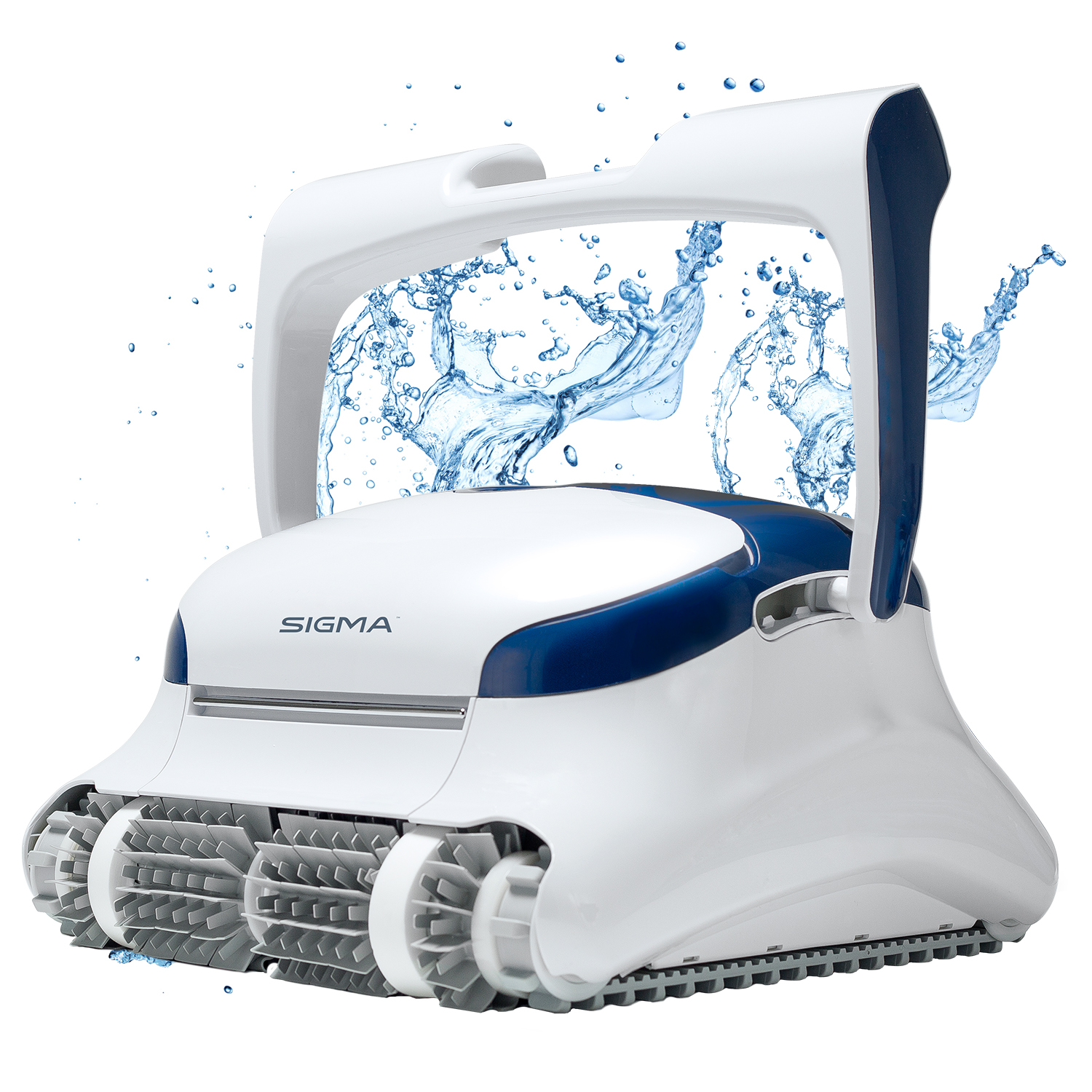
Dolphin Sigma
The Sigma has the most connected setup of the five robots compared here. Its myDolphin Plus app works over both Wi-Fi and Bluetooth, so you can pair it at the pool and reach it from elsewhere. In the app you build a weekly schedule by day and time, and the robot tells you when its filter is full, the alert that saves the most wasted cycles. It also responds to Siri voice control.
The hardware matches the software: three commercial-grade ProLine motors, quad scrubbing brushes, SmartNav 3.0 with an onboard gyroscope, and coverage of floor, walls and waterline in a 2.5-hour cycle. The warranty is 3 years. It is the highest-priced robot on this page.
- Best for
- In-ground pools up to 50 ft whose owners want scheduling by day, a filter alert and voice control.
- Keep in mind
- Highest price on the page and 24.6 lb to lift. Day-and-time scheduling lives in the app, so there is no avoiding the phone.
- 2
 $1599
$1799Save $200Temporarily out of stock
App control at the lowest price here
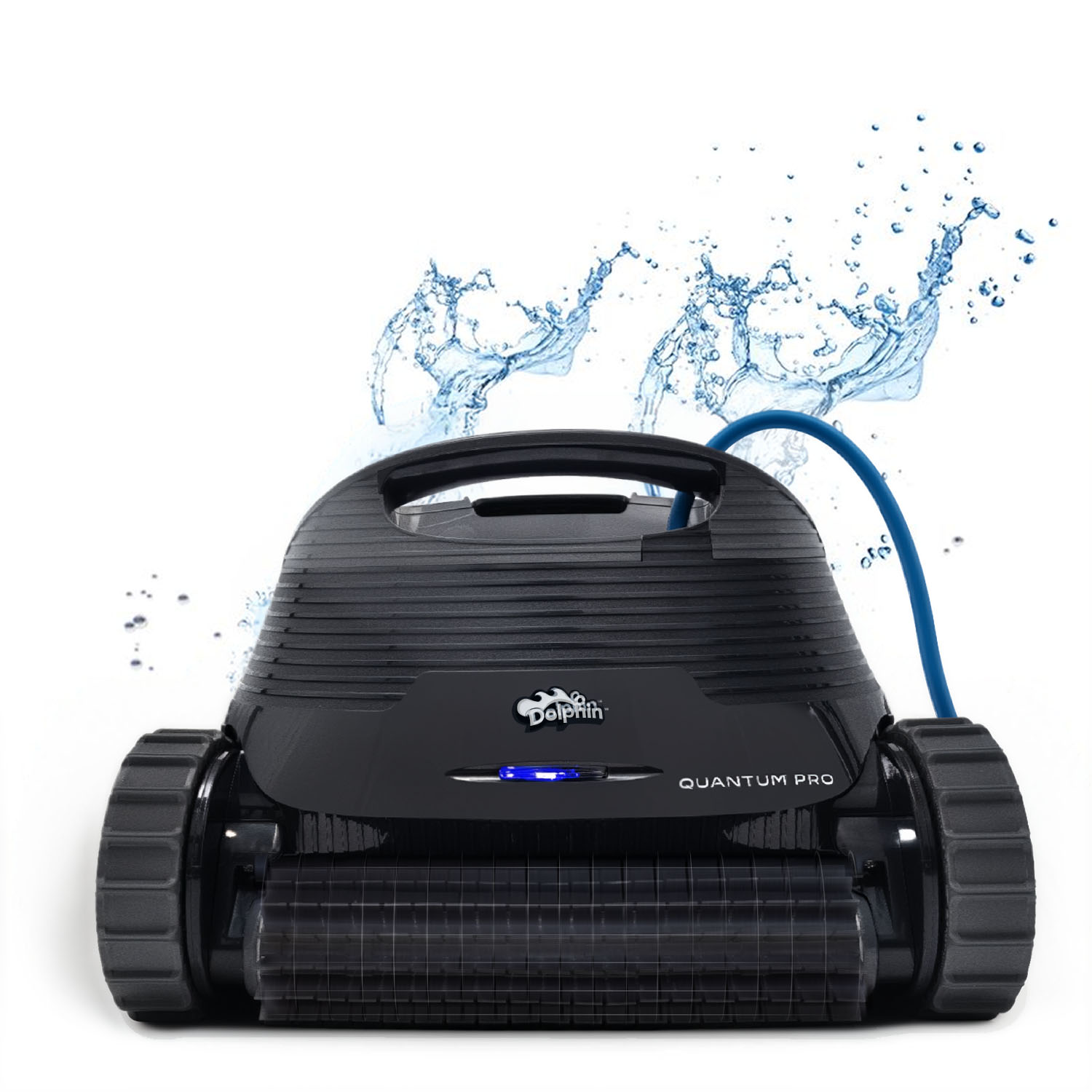
Dolphin Quantum
The Quantum is the lower-priced of the two app robots, and its app covers the functions most owners use: start, stop, schedule, cleaning modes and alerts, all in myDolphin Plus over Wi-Fi. Its sheet lists Wi-Fi only, so do not buy it for Bluetooth.
What it adds is independence from the phone. A weekly timer on the power supply runs it every day, every 2 days or every 3 days with no app at all, a comfort when the router is down. It cleans floor, walls and waterline, plus sun shelves, Baja ledges and stairs, in a 2-hour cycle, and its XXL MaxBin basket comes with standard and NanoFilter panels. It weighs 18.3 lb.
- Best for
- Owners who want to start and schedule from a phone without paying for the top model, with a button as backup.
- Keep in mind
- Wi-Fi only, so the home network must reach the power supply. No voice control on its sheet, and the warranty is 2 years.


How to judge a robot for this
What makes app control worth having.
- 1
What the app can actually do
Ignore the icon on the box and read the list. The useful functions are starting and stopping a cycle, scheduling, choosing how the robot cleans and receiving alerts. Each robot's app offers a different mix of these.
- 2
Wi-Fi alone, or Wi-Fi and Bluetooth
Wi-Fi lets you reach the robot from wherever your phone has a connection. Bluetooth talks to the power supply directly at short range, which helps with setup and when the home network is weak outdoors. One pick here has both.
- 3
Signal at the power supply
The power supply is the part that connects, and it sits outdoors near the pool. If your phone struggles to load a page at that spot, an app robot will struggle too. Check before you buy.
- 4
A way to run it without the phone
Apps get logged out and phones get lost. A timer on the power supply means the pool still gets cleaned on the day the app will not open. One pick here has that as well.
Side by side
Sigma and Quantum, spec by spec.
| Specification | Dolphin Sigma | Dolphin Quantum |
|---|---|---|
| Price today | $2349 | $1599 |
| Cleans | Floor, walls and waterline | Floor, walls, waterline, sun shelves and stairs |
| Scheduling | Weekly scheduler by day and time | Weekly timer: every day, every 2 days or every 3 days |
| App | myDolphin Plus (Wi-Fi and Bluetooth) | myDolphin Plus (Wi-Fi) |
| Filtration | NanoFilters and standard filter cartridges | XXL MaxBin basket with standard and NanoFilter panels |
| Brushes | Quad scrubbing brushes | Dual HyperBrush |
| Navigation | SmartNav 3.0 with gyroscope | SmartNav 2.0 |
| Cable | 55 ft with 360° anti-tangle swivel | 55 ft with anti-tangle swivel |
| Warranty | 3 years | 2 years |
What each app does.
Both picks use the myDolphin Plus app, but not in the same way. On the Sigma the app connects over Wi-Fi and Bluetooth and is where the weekly schedule is built, by day and time. It carries the filter alert, and the robot accepts Siri voice commands. On the Quantum the app connects over Wi-Fi and handles start, stop, scheduling, cleaning modes and alerts, while a separate timer on the power supply covers simple repeats.
Two cautions. Neither robot comes with a handheld remote; the phone is the remote. And apps change with updates, so treat this as what is published today and look at the app store listing for your phone before you buy.
The signal has to reach the power supply.
The robot works under water, where radio signals do not carry. The connection is made at the power supply, which sits on the deck or the lawn, back from the water's edge by the distance in the manual. That spot is often the farthest point from your router, with a wall or two in between.
Test it before you order. Stand where the power supply will go and load a web page over your home Wi-Fi, not mobile data. If it crawls, you have three choices: move the router or add an extender, choose the Sigma and use Bluetooth at the pool, or decide you do not need an app. Read the manual's network requirements before you buy an extender.
What an app will not do.
An app changes how you start the robot. It does not change what the robot is. Before you pay for connectivity, be clear about the jobs that stay with you.
- Empty the filter. A robot with a full filter runs its scheduled cycle and picks up very little.
- Put the robot in or take it out. Before shocking, adding chemicals or storing it for a long stretch, the lifting is yours.
- Free a tangled cable or a robot stuck on a step.
- Clean better. Cleaning comes from motors, brushes and filters, and an app adds none of those.
Setting up an app robot.
- Test your home Wi-Fi at the power-supply spot with your phone before the robot arrives.
- Pair the robot at the pool with the power supply plugged in, then walk indoors and confirm the app still reaches it.
- Build the schedule around the hours nobody swims, and turn on filter alerts if the app offers them.
- Show one other person in the house how to start a cycle, so the pool does not depend on your phone.
Questions, answered
App and Wi-Fi questions.
Is a robotic pool cleaner with Wi-Fi harder to set up than one without?
A little. Without an app you plug in and start. With one you also install the app, pair the power supply and join it to your home network, which goes quickly if the signal is good and slowly if it is not. After that first session, daily use is easier, because the schedule runs itself.
Can I start a cleaning cycle when I am away from home?
That is what Wi-Fi is for. With the power supply on your home network, the app can reach it from wherever your phone has a connection. The robot has to be in the water and plugged in already, so remote start suits a robot that stays in the pool between scheduled cycles, not one stored in the garage.
What happens if my Wi-Fi goes down?
You lose the remote features, not the robot. The Quantum's timer on the power supply keeps running its presets with no network. The Sigma's app also connects over Bluetooth, so you can still reach it from the pool deck. When the network returns, open the app and confirm the schedule is as you left it.
Is there an app-controlled robot for above-ground pools?
Not among the five Dolphins compared here. The two app robots, the Sigma and the Quantum, are in-ground robots and are not rated for above-ground pools. The two rated for above-ground pools, the Cayman and the Escape, have no app. For an above-ground pool, the Cayman's every-day timer is the closest thing to hands-off control.
Does the app tell me when the filter is full?
On the Sigma, yes: a filter alert in the app is a listed feature. The Quantum's app sends alerts; check the app for which ones. Of the robots without an app, the Premier shows a full-filter indicator on its power supply. In every case the alert is a reminder, and the rinse is still done by hand.
The verdict
Buy the app you will use.
If you want the robot on a weekly calendar, a warning when the filter is full and the option of Bluetooth at the pool, buy the Sigma. If you want to start and schedule from a phone for less, and like having a button timer behind it, buy the Quantum. If, reading this, you realize you only wanted the pool cleaned without being asked, a robot with a timer on its power supply does that for less than either.
Keep reading